Created page with "<div> == General Information == </div> <div>The Planer can be found inside the Wood Shop. The Purpose of this page is to give a more in-depth look at the Planer If you have any issues with Wood Shop equipment, the slack channels associated with this space include: #general, ##general, #shop-Wood, and #shop-CNC. == Orientation == <p>Do not operate any power equipment if you are under the influence of anything, in a hurry, are tired, or are not feeling w..."
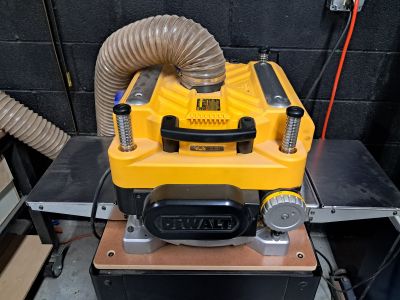
Information Regarding Equipment, and picture of equipment to the left.</div>
*<div class="li">The planer is used for milling boards to a desired thickness. This is often referred to as 'flattening' a board, but it's not quite that simple. A planer won't fix warped boards.</div>
*<div class="li">You can use a jig to correct warp and twist in boards if you don't want to use the jointer.</div>
*<div class="li">Ensure there is no metal in the board you are milling</div>
*<div class="li">Scrub dirt and dust off of the board prior to milling</div>
*<div class="li">Patience is important - make small cuts over multiple passes.</div>
*<div class="li">Support the ends of long pieces to avoid snipe.</div>
*<div class="li">The planer is loud and produces a lot of dust. Wear hearing protection and use dust collection.</div>
*<div class="li">Make sure you have enough outfeed space for your board.</div>
'''How to Use the Planer:'''
#<div class="li">Unlock the carriage and adjust the height so that the workpiece moves the rollers.</div>
#<div class="li">Lock the height</div>
#<div class="li">Adjust the gates and turn on the dust collector</div>
#<div class="li">Turn on planer</div>
#<div class="li">Feed the board into the planer with the grain at a slight angle. Make sure it is flat on the table.</div>
#<div class="li">Let board come through and slide free.</div>
The Purpose of this page is to give a more in-depth look at the Planer
If you have any issues with Wood Shop equipment, the slack channels associated with this space include: #general, ##general, #shop-Wood, and #shop-CNC.
Orientation
Do not operate any power equipment if you are under the influence of anything, in a hurry, are tired, or are not feeling well.
Inspect the equipment before using it.
The Planer has its own orientation, you can sign up for it by going to the main Berea Makerspace website.
Equipment
Planer
The planer is used for milling boards to a desired thickness. This is often referred to as 'flattening' a board, but it's not quite that simple. A planer won't fix warped boards.
You can use a jig to correct warp and twist in boards if you don't want to use the jointer.
Ensure there is no metal in the board you are milling
Scrub dirt and dust off of the board prior to milling
Patience is important - make small cuts over multiple passes.
Support the ends of long pieces to avoid snipe.
The planer is loud and produces a lot of dust. Wear hearing protection and use dust collection.
Make sure you have enough outfeed space for your board.
How to Use the Planer:
Unlock the carriage and adjust the height so that the workpiece moves the rollers.
Lock the height
Adjust the gates and turn on the dust collector
Turn on planer
Feed the board into the planer with the grain at a slight angle. Make sure it is flat on the table.